How to Create a Professional CV Online for Free in Bangladesh (Complete Guide)
A step-by-step guide for Bangladeshi students: what to include in a CV, how to write one with no experience, and how to build and download it free with OpportunityBD.
A CV is often the first thing an employer, a scholarship committee or an internship manager reads about you. For students and fresh graduates in Bangladesh, that first page can feel hard to get right: Which format should you use? What do you write when you have no job experience? Where do you find a clean template that does not cost money?
The good news is that you can build a clean, professional CV online without paying anything. In this guide you will learn what a student CV should contain, how to write it when you have little or no experience, which mistakes to avoid, and how to create your CV step by step with OpportunityBD’s Free CV Builder Bangladesh students can use, from choosing a design to downloading an A4 PDF.
 Start creating your professional CV for free with OpportunityBD.
What Is a CV and Why Do Students Need One?
CV stands for curriculum vitae. In Bangladesh the word is used for the document you send with almost every application, so you will see “CV” and “resume” used for the same thing. It is a short summary of your education, skills, experience and achievements.
Students need a CV long before their first full-time job. You may be asked for one when you apply for:
- an internship or part-time role,
- a scholarship or fellowship,
- a case, debate or competition team,
- a university club leadership position or a volunteer programme.
What Should You Include in a Professional Student CV?
If you are wondering what should be included in a student CV, start with these sections, in roughly this order:
- Personal information: your full name, a professional email address, phone number and city. A LinkedIn profile or portfolio link is useful if it is up to date. Use an email like name.surname@gmail.com, not a nickname.
- Professional summary or career objective: two or three sentences about who you are and what you are looking for. Be specific, for example: “Final-year BBA student seeking a marketing internship”.
- Educational qualifications: your university, degree, subject and dates, with CGPA. Add HSC and SSC results if you are early in your studies or the application asks for them. Write the grading scale (for example 3.60 / 4.00) so the reader understands the number.
- Skills: software, tools and languages you can really use, such as Excel, Canva, Python, or English and Bangla.
- Work experience and internships: include part-time jobs, freelance work and internships if you have them.
- Projects and achievements: class projects, competitions, awards, publications or a thesis.
- Extracurricular activities and volunteering: clubs, events you organised, social work.
- Certifications and training: online courses and workshops, especially relevant ones. You can also find short courses on OpportunityBD to add to this section.
- References: only when the application asks for them, and only people who have agreed to speak for you.
How to Create a Professional CV Online for Free Using OpportunityBD
If you want to know how to create a CV online without a design program, the steps below use the real OpportunityBD CV Builder. You need a free OpportunityBD account so your CV can be saved and edited later. The builder guides you through seven steps: Design, About you, Education, Experience, Skills, More and Finish.
Step 1: Visit the CV Builder and sign in
Open the CV Builder page and press Create Your CV. If you do not have an account yet, register for free or log in. Your CV is saved to your account, so you can come back and edit it at any time.
Step 2: Choose one of the five professional CV designs
The first step shows five designs: Classic ATS (a single-column layout with clear headings), Modern Professional (photo header and navy headings), Minimalist (a quiet serif style), Creative (a bold two-column layout) and Academic (education first, with grey section bars). The thumbnails use your own details once you have filled them in, and you can switch designs at any time without losing anything you typed.
 Choose from five professional CV designs.
Step 3: Enter your personal information
In About you, add your full name, professional title (for example “Marketing Student”), email, phone, location, and optional LinkedIn and portfolio links. Add a short profile summary. Modern Professional and Creative can show a photo, but this is optional and off until you tick the box.
 Add your personal information to get started.
Step 4: Add your educational qualifications
Press Add education and fill in the university or school, degree, subject, start and end dates, and CGPA or grade. Dates are chosen with month and year pickers. Tick “I study here now” if you are still studying, and add short points such as clubs or academic awards. Add one entry for each qualification, newest first.
Step 5: Include skills, experience, achievements and other details
In Experience you can add jobs and internships, writing what you did one point per line. In Skills, type a skill and press Enter to add it as a tag. There are separate boxes for technical skills, soft skills, languages and other skills. The More step covers projects, certifications, awards and competitions, extracurricular activities and volunteering, and optional references. References appear on your CV only if you tick the box to show them.
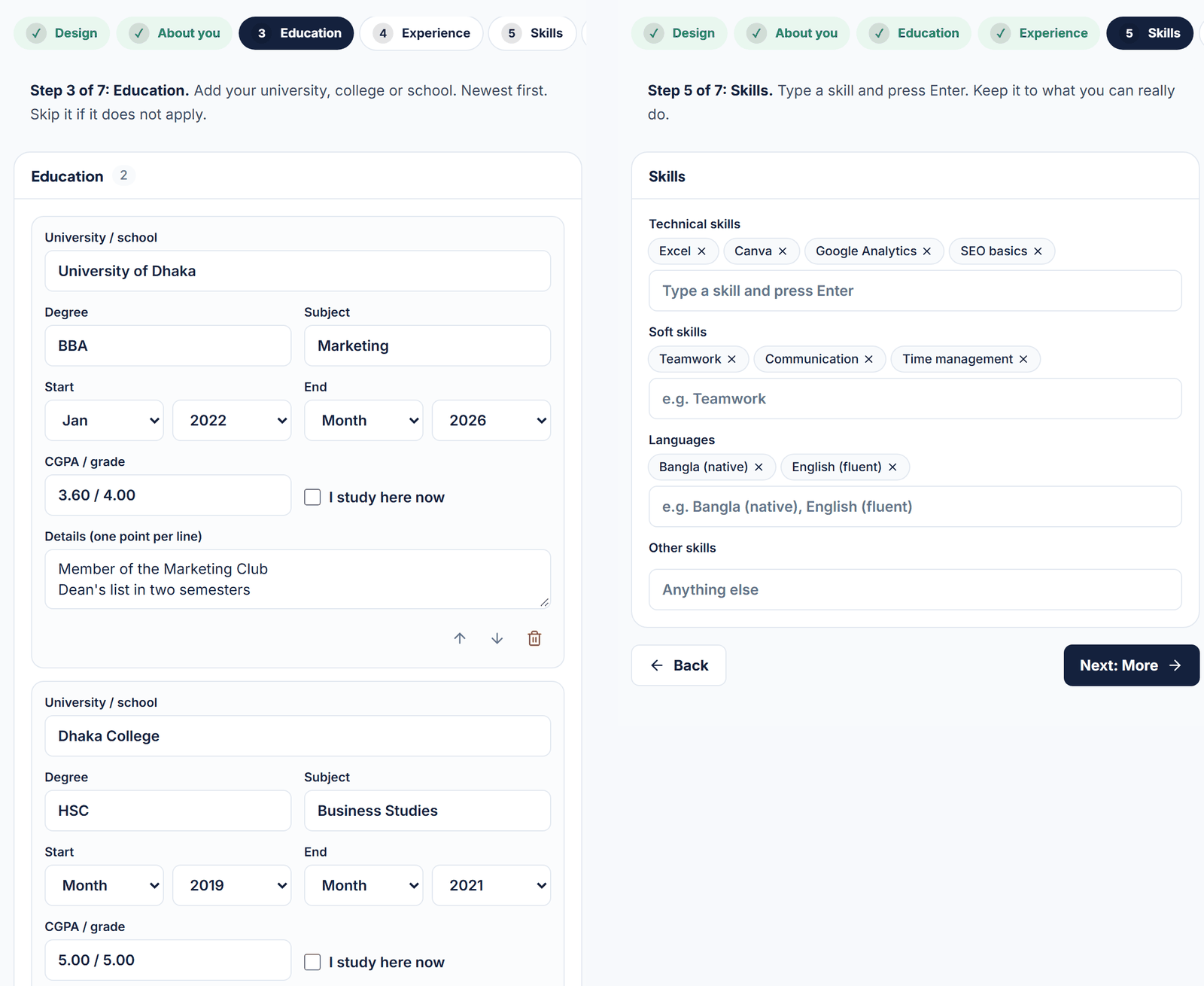 Add your academic qualifications and relevant skills.
Step 6: Customise your CV
The builder does not let you change fonts or colours, so customising means choosing the design that suits the application, deciding which sections to fill in, and ordering your entries. You can move any entry up or down inside its section, and keep several versions (for example one for internships and one for scholarships) under different names. Your changes are saved automatically while you type.
Step 7: Preview your CV
The live preview on the right updates as you type. Use Full preview to see the page at a larger size. The Finish step lists what is still missing, such as a summary or skills, before you mark the CV as complete.
 Customize and preview your CV before downloading.
Step 8: Download your CV as an A4 PDF
Press Download PDF. Your browser’s print window opens: choose Save as PDF, paper size A4 and margins Default, then save the file. The text in the PDF stays selectable, and the file is free to download.
 Download your professional CV in A4 PDF format.
The CV above uses made-up details for a sample student.
Best CV Format for Students and Fresh Graduates in Bangladesh
There is no single official format, but a student CV works best when it is simple, consistent and easy to scan. For most applications, aim for one page. A second page is reasonable only if you have real projects, experience or achievements to show.
A sample structure for a fresh graduate:
- Name, title, email, phone, city, LinkedIn
- Short summary (two or three sentences)
- Education (university first, then HSC and SSC if needed)
- Internships or experience
- Projects and achievements
- Skills and languages
- Certifications
- Extracurricular activities and volunteering
Some older Bangladeshi CV formats list details such as father’s name, religion or marital status. Most modern employers do not need these. Include personal details only when the job or scholarship form asks for them. Photos are also a choice: some local employers expect one, while others prefer none. Read the job post and follow it. If you are unsure, the Classic ATS design has no photo.
How to Make a CV Without Work Experience
Writing a CV for students with no experience is mostly about choosing what to show. Employers know you are early in your career. They look for evidence that you learn fast and take responsibility.
- Academic projects: describe what the project was, your role and the result. “Built a survey of 120 students and presented findings to the class” says more than “did a project”.
- Volunteering and clubs: organising an event, teaching younger students or leading a club team shows teamwork and responsibility.
- Competitions: case competitions, hackathons and debates show initiative. You can find current ones in competitions on OpportunityBD.
- Certifications: a short online course shows you invest in learning. List the course name, provider and year.
- Transferable skills: communication, time management and Excel or presentation skills are useful in almost every role. Support them with an example.
Once your CV is ready, browse current opportunities and apply to the ones that fit you. If you are new to the site, our guide on how to use OpportunityBD effectively shows how to search and save listings.
7 Common CV Mistakes You Should Avoid
- Making it too long. Cut anything old or irrelevant, such as school-level activities if you have university ones.
- Using an unprofessional email address. Create a simple name-based email.
- Writing a vague objective. “Seeking a challenging position” says nothing. Name the field and what you offer.
- Listing duties instead of results. Write what you did and what changed: “Managed the club page and grew followers from 300 to 900”, if that is true.
- Inconsistent formatting. Use one date format, one bullet style and the same order in each section.
- Spelling and grammar errors.
- Sending the same CV everywhere. Adjust your summary and the order of your skills to match each opportunity. Never add skills or achievements that are not true.
Tips to Make Your CV More Professional and ATS-Friendly
Some companies use applicant tracking systems (ATS) to read and sort CVs. No tool can promise that a CV will pass every system, but a clean format helps both software and people:
- Use a simple single-column layout with standard headings such as Education, Skills and Experience.
- Avoid tables, text boxes, icons and decorative graphics for key information.
- Use common fonts and a readable size.
- Use the words from the job description when they honestly describe you, for example the tools or skills the post lists.
- Keep bullet points short, starting with an action verb.
- Save as PDF unless the employer asks for another format, and use a clear file name.
Why Use OpportunityBD’s Free CV Builder in Bangladesh?
Many online CV makers show a design for free and then ask you to pay before you can download. OpportunityBD’s CV Builder is made for students:
- Five professional CV designs that you can switch between without retyping.
- A guided process with seven short steps and tips on each one.
- Customisable sections for education, experience, skills, projects, certifications, activities and optional references.
- A4 PDF download with selectable text.
- Free access for students, with no subscription fee.
- Saved CVs that you can edit later.
Ready to start? Open the OpportunityBD Free CV Builder, create your CV in a few steps, and use it to apply for the internships, scholarships and competitions that suit you.
Frequently Asked Questions (FAQ)
How can I make a CV online for free in Bangladesh?
Use an online tool that lets you download for free. With OpportunityBD, create a free account, open the CV Builder, choose a design, fill in your details and download the A4 PDF.
Which CV format is best for students in Bangladesh?
A one-page, single-column format with clear headings works well: summary, education, experience or projects, skills, activities and certifications. Always follow the format an employer or scholarship asks for.
Can I create a CV without work experience?
Yes. Highlight academic projects, internships, volunteering, club roles, competitions, certifications and skills. Describe what you did and the result.
How can I download my CV in PDF format?
In the CV Builder, press Download PDF, then choose Save as PDF in your browser’s print window. Select A4 paper and Default margins and save the file.
Is OpportunityBD’s CV Builder free?
Yes. It is free for students, with no subscription fee. You need a free OpportunityBD account to save your CV.
What information should I include in a student CV?
Include your contact details, a short summary, education with CGPA, skills, any experience or internships, projects, achievements, activities and certifications. Add references only if requested.
Can I use the same CV for jobs and internships?
You can use the same base CV, but adjust the summary and the order of your skills and projects for each application. In the CV Builder you can keep several CVs under different names.